

Not all workloads are equal, and not all migrations should follow the same path. The right strategy balances migration speed, application performance improvements, and the long-term cost of operating in the cloud. Understanding these trade-offs is what separates a successful migration from one that simply moves problems to a new location.
Key Takeaways
- ✓No single migration strategy fits every workload: most large migrations use all three approaches simultaneously.
- ✓Rehosting gets workloads to AWS fastest; refactoring delivers the best long-term ROI.
- ✓Score applications by business value and technical complexity before assigning a strategy.
- ✓AWS Migration Acceleration Program (MAP) funding can offset assessment and migration costs for qualifying organisations.
- ✓Migrate in waves: quick wins first to build team confidence before tackling complex workloads.
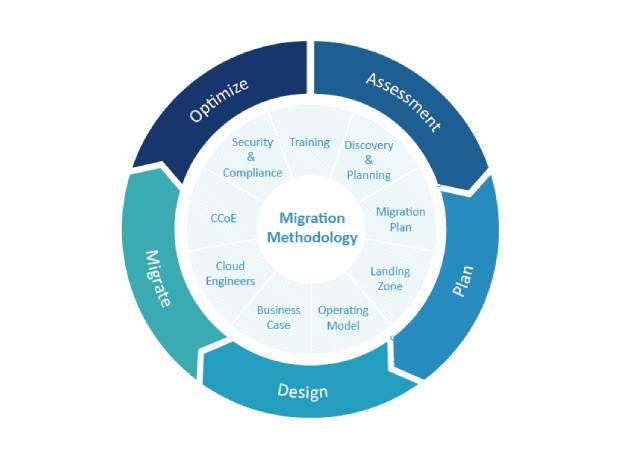
The Three Core Strategies
Rehosting
Lift and Shift
When to use
When time is critical and risk must be minimal
Primary AWS tools
Advantages
- Fastest path to cloud
- Minimal application changes
- Predictable timeline and cost
Considerations
- △Does not leverage cloud-native capabilities
- △Carries on-premise operational patterns
Example
Migrating an on-premise VM directly to an EC2 instance with identical configuration.
Replatforming
Lift, Tinker, and Shift
When to use
When you want performance gains without major rearchitecting
Primary AWS tools
Amazon RDS, AWS Elastic Beanstalk
Advantages
- Improved performance and reliability
- Reduced operational overhead
- Takes advantage of managed services
Considerations
- △Requires some application changes
- △More testing needed than rehosting
Example
Migrating a self-managed MySQL database to Amazon RDS while keeping the application layer mostly unchanged.
Refactoring
Re-architect
When to use
When innovation, scale, and long-term TCO are top priorities
Primary AWS tools
AWS Lambda, Amazon API Gateway, Amazon ECS/EKS
Advantages
- Maximum cloud-native benefits
- Best scalability and resilience
- Lowest long-term operational cost
Considerations
- △Highest upfront effort
- △Requires team capability investment
Example
Decomposing a monolithic application into microservices using Lambda and API Gateway.
How to Choose the Right Strategy
Most large migrations use all three strategies simultaneously, different workloads follow different paths based on their business criticality, complexity, and potential for cloud-native improvement.
Decision Framework
- 1. Inventory your applications and score them on business value and technical complexity.
- 2. Group applications into waves, quick wins first to build momentum and team confidence.
- 3. Apply rehosting to legacy systems heading for retirement; replatform line-of-business apps; refactor strategic differentiators.
- 4. Use the AWS Migration Acceleration Program (MAP) funding to offset assessment and migration costs (as an AWS cloud migration partner, Kitsilano can help you access MAP funding).
“Align your migration strategy with your business goals.”
If innovation and rapid scaling are top priorities, refactoring is the right investment. If speed to cloud matters most, start with rehosting and evolve from there.
Frequently Asked Questions
The 7 Rs are: Retire, Retain, Rehost, Replatform, Repurchase, Refactor, and Relocate. AWS's practical guidance focuses on the 3 core Rs (Rehost, Replatform, and Refactor) as these cover the vast majority of workloads. Retire and Retain are applied upfront during discovery to shrink the migration scope before a single server moves.
Rehosting suits workloads where speed is the priority: applications scheduled for retirement, systems with hard data centre exit deadlines, or legacy workloads where the engineering investment in refactoring would not justify the business benefit. It delivers the fastest path to cloud, but plan to modernise these workloads post-migration.
A migration of 20 to 50 workloads typically takes 3 to 6 months. Large enterprise migrations of hundreds of workloads run in waves over 12 to 24 months. The assessment and mobilisation phases alone take 6 to 10 weeks. AWS MAP funding can offset the cost of the discovery phase for qualifying organisations.
MAP is an AWS programme that provides credits, tooling, and funding to reduce the cost of large-scale migrations. It typically covers assessment tooling, migration service fees, and partner costs. As an AWS Advanced Partner, Kitsilano Technologies can help qualifying organisations access MAP funding and structure their migration to meet the programme requirements.