

AWS Identity and Access Management (IAM) empowers you to control who can access your AWS resources and how they can interact with them. For a successful migration, implementing a layered IAM strategy is not optional, it is the foundation upon which every other security control is built.
Key Takeaways
- ✓IAM is the foundation of AWS security: get it wrong and every other control is undermined
- ✓Use IAM roles with temporary credentials instead of long-lived access keys
- ✓MFA must be enforced on all human accounts, especially the root account and privileged roles
- ✓CloudTrail provides the tamper-evident audit log required by most compliance frameworks
- ✓Phase-specific IAM roles reduce blast radius if any single set of credentials is compromised
1. Enforce the Principle of Least Privilege
Limit permissions to the absolute minimum necessary for each task. Employ IAM roles with precisely scoped permission policies rather than granting broad access that persists beyond its intended use.
Best Practice
Audit all IAM policies quarterly using AWS IAM Access Analyzer to identify and revoke permissions that are no longer needed (see the AWS IAM best practices guide for a complete checklist).
2. Leverage AWS Identity Federation
Integrate with your existing identity provider (IdP), whether Microsoft Active Directory, Okta, or another SAML 2.0-compatible system. Identity federation eliminates the need for separate IAM user accounts and ensures that access policies are consistent across your entire organisation.
This also simplifies user lifecycle management: when an employee leaves, deprovisioning their corporate account automatically removes their AWS access.
3. Enforce Multi-Factor Authentication (MFA)
MFA adds a critical second layer of defence. Even if credentials are compromised, an attacker cannot access your AWS environment without the second factor. Enforce MFA for all human users, especially for root and privileged accounts, using an IAM Service Control Policy (SCP) that denies API calls unless MFA is present.
Key Insight
The AWS root account should never be used for daily operations. Lock it down with MFA and a hardware security key, then create dedicated admin IAM roles for operational tasks.
4. Create Role-Based Access for Migration Stages
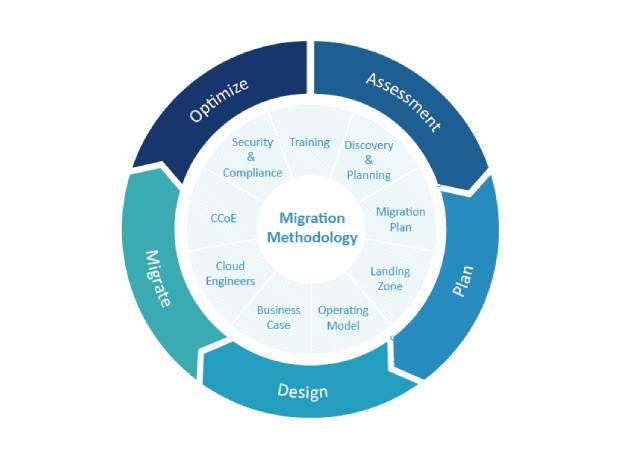
Cloud migrations typically span four phases, Assess, Mobilize, Migrate, and Modernize. Each phase involves different teams and different levels of access. Define distinct IAM roles per migration phase:
- Assessment Role: Read-only access to inventory tools and cost calculators.
- Landing Zone Role: Permission to provision VPCs, subnets, and security groups within defined guardrails.
- Migration Role: Access to AWS Migration Service (MGN) and Database Migration Service (DMS) only.
- Operations Role: Day-to-day operational access with CloudWatch and Systems Manager, scoped by environment.
5. Use Temporary Credentials with AWS STS
Utilize IAM roles and the AWS Security Token Service (STS) to generate temporary, short-lived credentials for users and applications. These credentials expire automatically, minimising the blast radius of any credential compromise and eliminating the risk of long-lived access keys being leaked in code repositories.
6. Define Permissions with CloudFormation Templates
Implement AWS CloudFormation templates to create and manage infrastructure and IAM resources. By codifying permissions alongside infrastructure, you ensure consistency across environments, enable peer review of access changes, and maintain a version-controlled audit trail of every permission modification.
Implementation Tip
Use AWS Service Control Policies (SCPs) in AWS Organizations to establish preventive guardrails that no IAM policy can override, ensuring teams can't accidentally grant themselves excessive permissions.
7. Enable CloudTrail for Full Audit Visibility
AWS CloudTrail captures every API call and action in your AWS account, providing a complete, tamper-evident audit log. Enable CloudTrail in all regions, configure log file validation, and stream events to Amazon CloudWatch Logs for real-time anomaly detection and alerting. The CloudTrail documentation covers multi-region trail setup in detail.
Pair CloudTrail with AWS Security Hub and Amazon GuardDuty to automatically detect suspicious behaviour, such as unusual login locations, privilege escalation attempts, or data exfiltration patterns, and trigger automated remediation workflows.
“Security is not a feature, it is a foundation.”
Building IAM right from day one of your migration eliminates entire categories of risk.
Frequently Asked Questions
Least privilege means granting each user or role only the exact permissions needed to perform their specific tasks. In practice, this means writing tightly scoped IAM policies rather than attaching broad policies like AdministratorAccess. Use IAM Access Analyzer regularly to identify and revoke permissions that are granted but never exercised.
AWS CloudTrail records every API call and user action taken in your AWS account, creating a complete, tamper-evident audit log. Most compliance frameworks including ISO 27001, SOC 2, and PCI DSS require audit trails of all privileged actions, making CloudTrail effectively mandatory for regulated environments.
AWS IAM manages access within a single account. AWS IAM Identity Center (formerly AWS SSO) provides centralised access management across multiple accounts and integrates with external identity providers like Microsoft Active Directory and Okta, enabling single sign-on across your entire AWS Organisation from one dashboard.
Always use IAM roles over long-lived IAM users where possible. Roles generate short-lived credentials via AWS STS that expire automatically, eliminating the risk of static access keys being leaked in source code or config files. Reserve IAM users only for the rare service account that genuinely cannot use role-based authentication.