

The shift to cloud computing dissolves traditional network perimeters. The tools and strategies that kept on-premise environments secure, firewalls at the edge, trusted internal zones, VPN access, are insufficient for protecting dynamic cloud workloads. Fortinet’s Security Fabric addresses this directly with a cloud-native architecture designed for how organisations actually operate today.
Key Takeaways
- ✓Zero Trust assumes every connection is untrusted until verified: this is the only model that works for distributed cloud environments.
- ✓FortiGate NGFWs inspect traffic by application rather than port: critical when almost all cloud traffic moves on port 443.
- ✓Fortinet integrates natively with AWS Gateway Load Balancer, GuardDuty, Security Hub, and WAF for unified visibility.
- ✓No single tool provides complete protection: multi-layered security ensures that a bypass of one control does not become a breach.
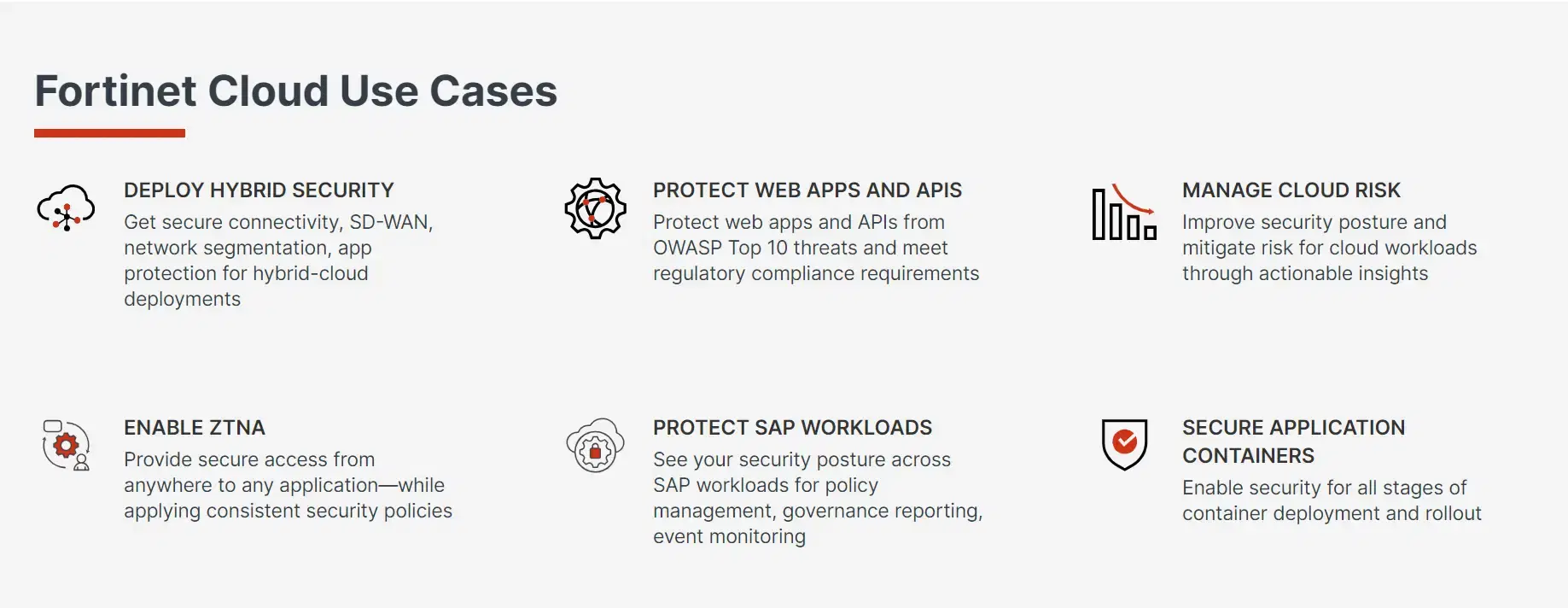
Zero Trust: The Foundation of Cloud Security
Zero Trust is a security model that assumes no user, device, or connection, whether inside or outside the network, can be trusted by default. Every access request must be verified continuously, regardless of origin. With cloud environments where resources are accessed from corporate offices, home networks, and mobile devices simultaneously, Zero Trust is not optional. The AWS Well-Architected Security Pillar also recommends Zero Trust principles as a core design pattern.
FortiAuthenticator
Centralised identity and access management with MFA enforcement, SSO, and RADIUS/LDAP integration for all cloud and on-premise access.
FortiToken
Hardware and mobile token solutions for strong two-factor authentication, fully integrated with FortiAuthenticator and your existing IdP.
FortiClient ZTNA
Zero Trust Network Access agent that verifies both user identity and device health before granting access to cloud workloads, regardless of user location.
FortiPAM
Privileged Access Management for controlling and auditing access to high-value cloud resources by administrators and service accounts.
Implementation Tip
Ensure all users, whether internal employees or external contractors, access cloud applications through authenticated, ZTNA-secured connections. FortiClient ZTNA replaces legacy VPN with continuous trust verification on every request.
FortiGate NGFWs: Securing Cloud-Bound Traffic
Cloud environments connect with on-premises data centres, third-party SaaS services, and external partners, creating a complex web of traffic that traditional security tools cannot inspect. FortiGate Next-Generation Firewalls (NGFWs) protect this traffic with:
Application-Aware Filtering
Identify and control cloud applications by name, not just IP and port, blocking shadow IT while allowing approved services.
Intrusion Prevention System (IPS)
Real-time detection and blocking of exploits, vulnerability scans, and lateral movement attempts across cloud and on-premise workloads.
SSL/TLS Deep Inspection
Inspect encrypted traffic, including HTTPS, to detect threats that would otherwise bypass perimeter controls.
FortiGuard Threat Intelligence
Continuously updated global threat intelligence feeding real-time signatures and blocking rules to every FortiGate deployment.
AWS Deployment Tip
Deploy FortiGate as a virtual appliance within your AWS VPC using the FortiGate VM from AWS Marketplace. Use Fortinet's auto-scaling templates to ensure your NGFW capacity grows automatically with your workload, maintaining consistent security posture during demand spikes.
Seamless Integration with AWS
Fortinet integrates natively with AWS services to provide unified visibility and control across your cloud infrastructure. FortiGate VM is available through the AWS Marketplacewith Fortinet's auto-scaling CloudFormation templates included.
FortiGate + AWS Gateway Load Balancer
Transparent insertion of FortiGate inspection into all VPC traffic flows without changing application routing.
FortiWeb + AWS WAF
Layered web application protection combining Fortinet's ML-powered WAF with AWS-native controls.
FortiSIEM + AWS Security Hub
Centralised security event correlation from AWS services, Fortinet products, and third-party sources, with automated response workflows.
FortiCNP + AWS GuardDuty
Cloud-native protection that enriches GuardDuty findings with Fortinet threat intelligence for faster, more accurate incident response.
Why Multi-Layered Security Matters
No single security tool provides complete protection. A multi-layered security posture ensures that even when one control fails or is bypassed, other layers remain in place to detect and contain threats before they reach business-critical systems.
Fortinet’s Security Fabric provides this layered approach at every tier, identity, network, endpoint, application, and data, all managed from a unified console with integrated threat intelligence and automated response capabilities.
“Assume breach. Verify everything. Trust nothing by default.”
The Zero Trust principle is not a product, it is a mindset that should permeate every security decision in your cloud environment.
Frequently Asked Questions
ZTNA requires continuous verification of every user and device before granting access to any application or resource, regardless of network origin. Unlike VPN, which grants broad network access once authenticated, ZTNA grants access only to specific applications. This dramatically limits lateral movement if credentials are compromised.
FortiGate deploys as a VM within your VPC, available through AWS Marketplace. It integrates with AWS Gateway Load Balancer for transparent traffic inspection without changing application routing. Fortinet provides CloudFormation templates for automated deployment, and auto-scaling allows FortiGate capacity to grow with your workload.
Yes, they are complementary. AWS native tools (GuardDuty, Security Hub, WAF) provide excellent cloud-native detection. Fortinet adds application-aware NGFW inspection, unified policy across cloud and on-premise, and the FortiGuard threat intelligence feed. FortiSIEM correlates events from both into a single operational view.
Traditional firewalls control traffic by IP and TCP/UDP port. NGFWs identify traffic by application name (not just port), inspect encrypted TLS traffic, run intrusion prevention, and integrate with global threat intelligence. In cloud environments where nearly all traffic runs on port 443, NGFW-level application awareness is the difference between meaningful security and a false sense of it.